
Use Your Head: Getting the Best from Thermal Transfer Printheads
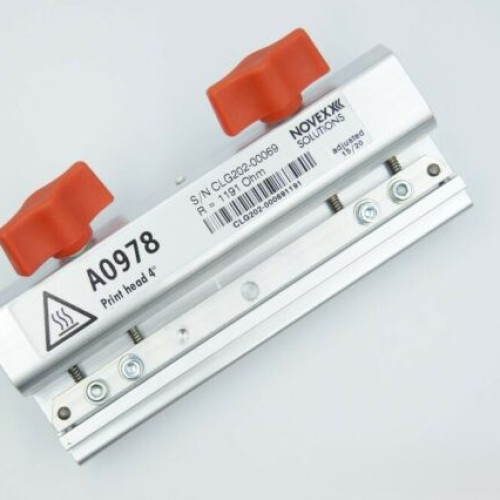
The printhead is the heart of any thermal transfer printer — and its most expensive wear part. Treat it well and it will print out crisp, first-scan barcodes for millions of labels. Neglect it and you'll see voids, faded codes and an early, costly failure. To help our customers get the best from their printheads, here's the ALS guide to what a printhead actually is, how to get the longest life and the best print quality from it, and how to tell when a fault is really the head, or something cheaper to fix.
What is a thermal transfer printhead?
A thermal transfer printhead is a slim ceramic strip lined with hundreds of tiny heating elements — commonly 8, 12 or 24 dots per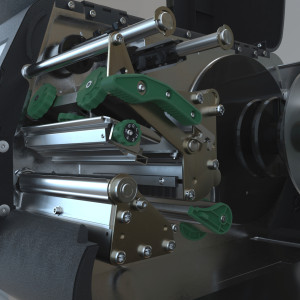 millimetre (roughly 200, 300 or 600dpi). As the label and ribbon pass beneath it, each element heats and cools thousands of times a second, melting ink from the ribbon onto the label surface. A thin protective glaze shields the elements from the constant friction of media and ribbon, but it's only microns thick — which is why the head is at once extremely precise and genuinely delicate. Every ribbon, label and setting you choose either protects it or wears it down.
How long should a printhead last?
As a rule of thumb, a printhead is rated for somewhere around 30–50km of media — very roughly a million linear inches, or in the region of 750,000 to 1.5 million labels depending on their size. In a low-volume operation that can mean several years; on a line running continuously it might be a matter of months. Where you land within that range — or how far beyond it you get — comes down almost entirely to the consumables, settings, environment and cleaning routine below. Good habits can add well over half again to a head's working life; bad ones can halve it.
Start with the right consumables
Nothing influences print quality and printhead life more than what you run beneath the head. This is where good habits pay for themselves many times over.
- Match the ribbon to the label. Wax, wax-resin and resin ribbons each suit different label materials and durability
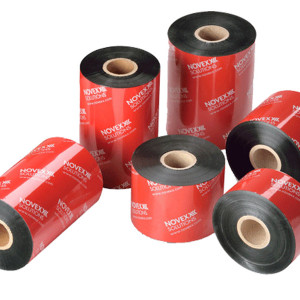 requirements. A resin ribbon designed for synthetic labels behaves very differently on a paper label — the wrong pairing gives poor transfer, smudging and a head working far harder than it needs to. If you're unsure which grade fits your stock, see our thermal transfer ribbons range.
 - Use quality, consistently-wound ribbon. Cheap or poorly-wound ribbon can carry abrasive impurities, an uneven ink coat, or no back-coating at all — each of which scrubs away at the printhead. A properly made ribbon includes a back-coat that lubricates the head and dissipates static as it runs.
- Keep the ribbon wider than the label. Running labels wider than the ribbon exposes the head to the label edge and adhesive — one of the fastest ways to score a printhead. Always let the ribbon overhang the label on both sides.
- Mind the label surface. Rough, recycled or heavily-coated materials are more abrasive, and some synthetics wear a head faster than paper however well you maintain it; if you're chasing high durability, the right material-and-ribbon combination matters as much as the printer itself.
Get the settings right: heat, speed and pressure
Thermal transfer printing is a balance of three variables, and the aim is always the same: the lowest energy that still gives a solid, scannable print. Anything beyond that just shortens the life of the head.
- Heat (darkness). Too little and codes come out faint and patchy; too much and you get ink bleed, ribbon wrinkle and accelerated element wear. Set the darkness just high enough for a clean, dense print that scans first time — then stop.
- Speed. Faster printing gives the ribbon less dwell time to transfer, so higher speeds often need a little more heat. Push it too far and you get incomplete transfer and slippage. Slowing down improves fine detail and small barcodes, and is kinder to the head.
- Pressure. Even, correctly-set head pressure keeps contact uniform across the full width. Too little leaves light patches to one side; too much accelerates wear and can damage both the head and the platen roller. Re-check pressure whenever you change label width.
Watch out for the vicious circle here: a dirty head or badly-set pressure gives weak print, the operator winds the darkness up to compensate, and that extra heat then cooks the head. Fix the underlying cause rather than masking it with more heat. And wherever you can, confirm results with a barcode verifier — or at least a consistent scanner — rather than judging by eye. A code that looks perfectly fine can still grade poorly.
Mind the printer's environment
Where a printer lives has as much bearing on printhead life as how it's run — and it's the factor most often overlooked.
Dust and airborne particles
In a busy manufacturing or packing area, fine particles are constantly in the air, and they inevitably work their way under the printhead — abrading the elements and forcing far more frequent cleaning. If quality keeps dropping despite a good routine, the location may be the real culprit. Moving the printer into a cleaner side office, or shielding it in a dust cover or enclosure, can transform head life; even keeping the lid closed between jobs and siting it away from open doorways helps.
Cold and condensation
Cold locations — beside a goods-in door, in a chilled packing hall or a cold store — are hard on printheads and best avoided. When both the labels and the head are cold, the ribbon won't transfer cleanly, and the instinctive fix of turning the darkness up to force a good print is exactly the wrong move: driving extra heat into a cold head dramatically reduces its life. If a printer genuinely has to run in the cold, small internal heating bars can take the edge off, but they're a compromise rather than a cure. Wherever possible, keep the printer and its media somewhere warmer and more stable, and feed labels to the line from there.
Clean it regularly
Residue from ribbon, label adhesive and airborne dust builds up along the printhead and acts as an insulating layer between the elements and the label. The printer then runs hotter to compensate — and running hotter accelerates wear. It's the most common cause of streaks, voids and unreadable codes, and cleaning takes seconds.
- Clean at every ribbon or roll change as a minimum — and more often in dusty or high-volume environments.
- Power down and let it cool. Switch the printer off (or use its built-in cleaning routine) and allow the head to cool before you touch it.
- Use the right tools. Good-quality isopropyl alcohol (99% — lower grades hold too much water) on a lint-free foam swab, card or cleaning pen, or dedicated printhead wipes. Avoid cotton wool, which sheds fibres, and never use water, household solvents, anything abrasive, or compressed air, which just drives debris further in.
- Wipe firmly along the print line in one direction — you're lifting build-up off, not dabbing it around — and let the IPA evaporate fully (give it a good minute) before reloading.
- Recalibrate on every roll change. Batches of labels vary just enough to shift registration; a quick calibration keeps codes landing in the right place and avoids jams.
- Keep it clean between cleans. Close the printer when it isn't running, keep it away from dusty areas, and load ribbon and labels straight from their packaging rather than off the floor or a dirty bench.
Don't overlook the platen roller
The platen roller — the rubber cylinder directly beneath the printhead — is the head's partner, and just as much a wear part. It drives the label through and provides the backing pressure that lets the head print evenly. Over time it collects adhesive and can develop nicks or a glazed surface, and leaving the head clamped down on it for long periods presses flat spots into the rubber — any of which cause slipping, uneven density and misfeeds that are easily mistaken for a failing head. Clean it with IPA on a lint-free cloth at least monthly, turning it by hand to reach the whole surface, and if you ever find a label wrapped around it, peel it off gently rather than with a blade. As a rule, when a printhead reaches the end of its life, it's worth checking whether the roller has too.
Handle with care
- Never touch the print line with fingers, tools or anything metal. Skin oils corrode the elements and scratches are
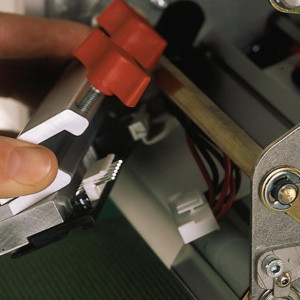 permanent — always handle the head by its edges, and take off rings or watches before you reach in.
 - Watch for static. Printheads are sensitive to electrostatic discharge, which can punch microscopic holes through the glaze; earth yourself (or use an anti-static mat) before handling, and good back-coated ribbon helps dissipate static during printing.
- No sharp objects. Never scrape adhesive or debris away with a blade — soften it with IPA and lift it gently instead.
- Let it cool, keep it dry. Allow the head to cool before cleaning or removing it, and make sure it's completely dry before printing again.
- Don't leave it clamped down. If a printer will sit idle for a while, release the head: left clamped it can flatten the platen roller beneath, and on damp stock in a humid area it can bond to the media and tear the coating when printing resumes.
Is it the printhead, the ribbon or the settings?
When quality drops it isn't always the head at fault, and replacing a head that was fine is an expensive mistake. A few quick checks usually point to the real culprit:
- Consistent vertical white lines in the same place on every label point to dead elements — a worn head. If the lines shift or vanish when you fit a fresh ribbon, it was ribbon wrinkle, not the head.
- Smudged or blurred print is rarely the head — look instead at ribbon grade (wrong formulation for the material), contaminated labels or too much heat.
- Voids or missing patches — clean the head first; if they stay in exactly the same spot after a thorough clean, that section may be damaged.
- Overall fading — clean the head, reduce the speed and check the darkness, and try a fresh roll of ribbon before concluding the elements are worn out.
Signs it's time for a new printhead
Cleaning and good settings extend a head's life, but they can't revive worn or damaged elements. It's genuinely worn when you see: multiple vertical white lines that survive both a clean and a ribbon change; print that stays faint across the whole width despite correct darkness and a clean head; darkness that's noticeably uneven from one side to the other; barcodes that once passed now failing verification; or a printhead resistance/temperature warning from the printer itself. One or two faint lines may be liveable depending on your quality bar — multiple dead elements are not. Check the platen roller at the same time, as a worn roller will undo the benefit of a new head.
Frequently Asked Questions:
Most are rated for around 30–50km of media — roughly 750,000 to 1.5 million labels, depending on size. Good consumables and regular cleaning take you towards the top of that range; poor media and a neglected head can halve it.
At every ribbon or roll change as a minimum, and more often in dusty or high-volume settings. Clean the platen roller and sensors about monthly, and check pressure and calibration every few months.
A lint-free foam swab or cleaning pen with good-quality isopropyl alcohol (99% — lower grades hold too much water), wiped gently along the print line in one direction. Avoid cotton wool, which sheds fibres, and steer clear of water, household solvents, abrasives and compressed air.
You "can", but it's best avoided. Airborne dust works under the head and speeds up wear, so a cleaner side office or an enclosure helps. Cold is harder still: when the head and labels are cold the ribbon won't transfer well, and turning the darkness up to compensate drastically shortens head life. Where you can, site the printer somewhere warmer and more stable and feed labels to the line from there.
Clean it first — most faint or streaky prints are residue rather than a worn head. Consistent white lines in the same place that survive a clean and a fresh ribbon usually mean dead elements; fading across the whole label is more often darkness, speed or ribbon grade.
On most industrial printers, yes — the head is a user-replaceable part. It's becoming easier and quicker to do. Both the Novexx and Eidos printers have quick-fit heads that literally take seconds to replace. We supply genuine Novexx & Eidos printheads and can talk you through fitting, or fit and check it for you on a service visit.
Yes. We hold genuine Novexx and Eidos printheads and platen rollers in stock, so we can get you running again quickly — along with genuine Novexx ribbons and advice on the consumables and settings that make a new head last.
Often, yes. The platen roller — the rubber cylinder beneath the head — wears with use, and a flat-spotted or nicked roller causes uneven pressure and poor print even with a brand-new head. It's worth inspecting, and usually replacing, alongside the printhead.
Get it right, and we'll help
Master these fundamentals — quality consumables, sensible settings, a suitable environment, a simple cleaning routine and careful handling — and a printhead will comfortably reach its rated life while producing first-scan barcodes every time. Most premature failures we see come down to one of these being overlooked.
As part of the Possehl Identification Solutions Group, we convert our own labels here in the UK and supply genuine Novexx thermal transfer ribbons, matched to your printer and application, and we support the full range of Novexx & Eidos industrial printers and print & apply systems. We also hold genuine Novexx & Eidos printheads and platen rollers in stock — so if a part reaches the end of its life, we can supply it quickly, guide you through fitting, or replace and check it on a service visit. And if you're battling print-quality problems, getting through printheads too quickly, or simply not sure which ribbon suits your labels, we will help you find the right combination
Explore our genuine Novexx thermal transfer ribbons, or talk to us about the right consumables and parts for your printer.